◈ Obsidian MCP

Self-hosted · Markdown-native · MCP

自托管 · Markdown 原生 · MCP

Your notes are already the interface.

你的笔记,
本身就是界面。

One self-hosted Markdown vault that multiple agents can share — Claude, Cursor, Codex, or your own tools, from different machines and networks. They read and write the same knowledge and memory, with per-agent credentials and attributed writes.

一个自托管的 Markdown Vault,多个 Agent 共享——Claude、Cursor、Codex,或你自己的工具,来自不同机器和网络。它们读写同一份知识与记忆;每个 Agent 独立凭据,写入带归属。

It speaks Streamable HTTP MCP, returns a revision on every note write, and keeps memory and skills as plain Markdown you can open. The memory is one set of files, not one silo per agent.

它使用 Streamable HTTP MCP,每次笔记写入返回 revision,把记忆和 Skill 保持为可直接打开的 Markdown。记忆是一组文件,而不是每个 Agent 各一套孤岛。

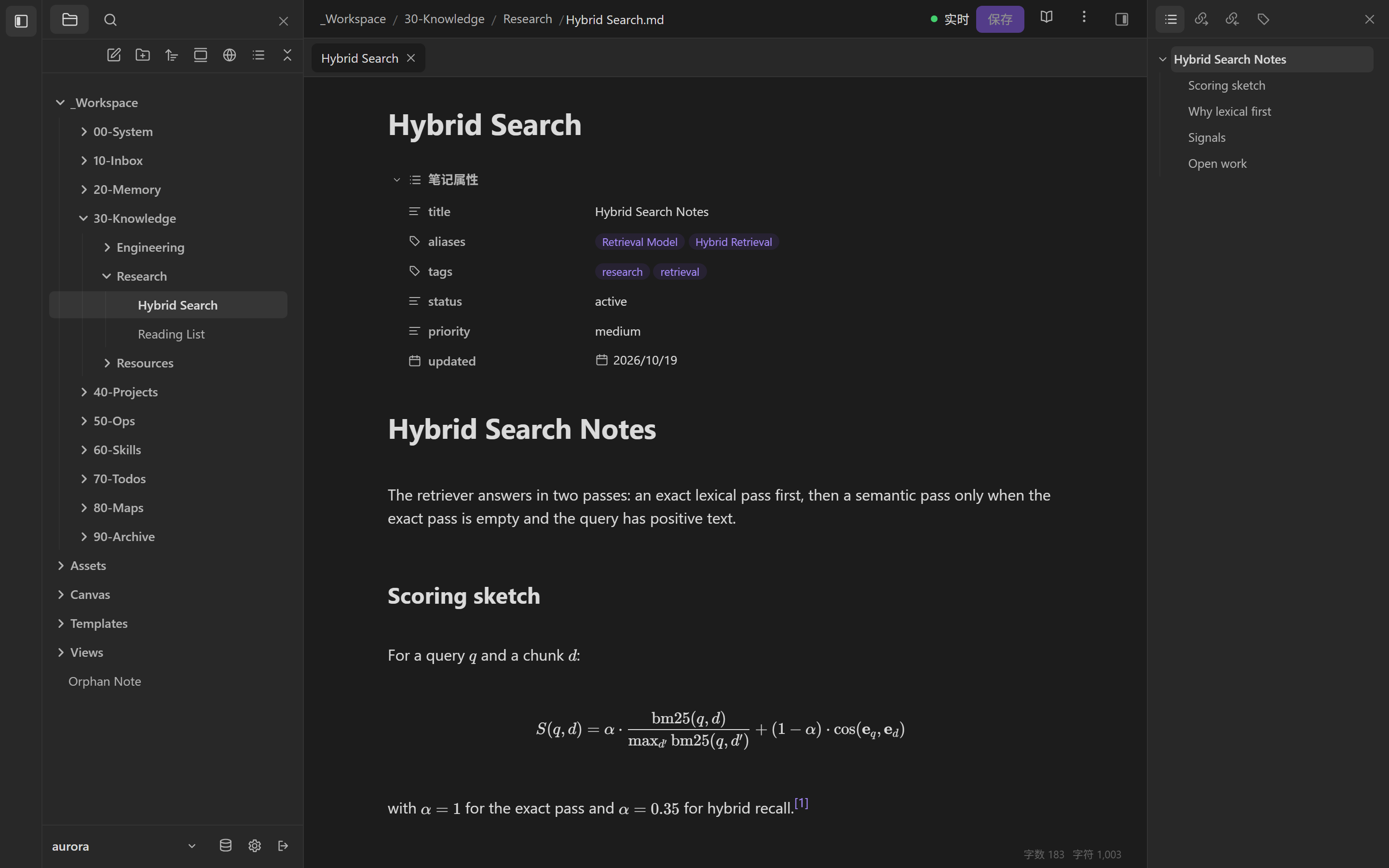
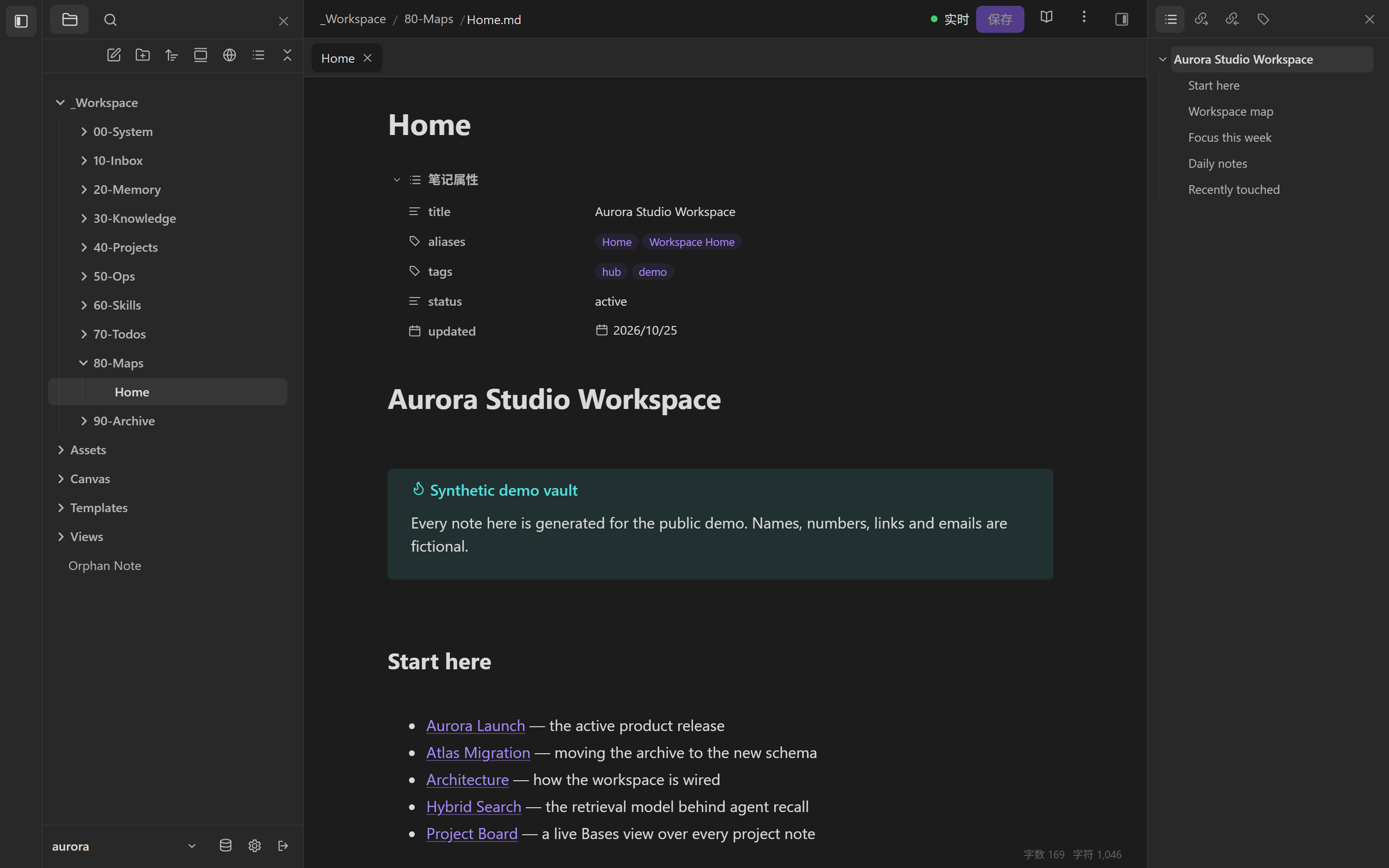
Obsidian Web workspace: explorer, properties, reading view and outline
The workspace shell: explorer, properties, reading view, outline. 工作区:文件树、属性、阅读视图、大纲。 01
same files, two readers 同一份文件,两个读者
87MCP tools in the full profile完整发现模式的 MCP 工具
1shared endpoint for many agents多个 Agent 共用一个端点
31 / 75notes and links in the demo演示库中的笔记与链接
2.1OAuth with PKCE, plus scoped keysOAuth + PKCE,另支持受限 API Key
⊕

One memory, many agents.

一份记忆,多个 Agent。

The point is not another chat client. It is a shared substrate: one self-hosted vault, reachable over HTTPS, where different agents on different machines read and write the same knowledge and memory.

重点不是再做一个聊天客户端,而是一层共享底座:一个自托管 Vault,通过 HTTPS 可达,让不同机器上的不同 Agent 读写同一份知识与记忆。

Not a sync product: one server and one vault, with many clients. Remote access is your network boundary — HTTPS, a VPN, or a private tunnel.

它不是多点同步产品:一个服务端、一个 Vault、多个客户端。异地访问取决于你的网络边界——HTTPS、VPN 或私有隧道。

Same memory, no silo

同一份记忆,没有孤岛

Every connected agent calls the same memory_recall and reads the same files. A decision captured by one agent is available to the next, without an export step.

每个接入的 Agent 调用同一个 memory_recall,读同一批文件。一个 Agent 记下的决策,下一个 Agent 直接可用,不需要导出。

Per-agent credentials

每个 Agent 独立凭据

Give each agent its own OAuth account or API key, scoped to read, write or files and limited to chosen vaults. Revoke one without touching the others.

每个 Agent 使用独立的 OAuth 账户或 API Key,按 read / write / files 分权,并限制到指定 Vault。撤销一个不影响其他 Agent。

Attributed writes

写入带归属

Writes can carry an author and model trailer, and the admin audit records which agent acted. You can tell who changed what.

写入可带 author / model 归属,Admin 审计记录是哪个 Agent 操作。谁改了什么,可以追溯。

Conflict-safe by default

默认冲突安全

Every note write returns a revision. A stale write is rejected instead of silently overwriting another agent's change; multi-note plans are journaled.

每次笔记写入返回 revision。过期写入会被拒绝,不会静默覆盖另一个 Agent 的修改;多笔记计划写入 journal。

A day with three agents

三个 Agent 的一天

09:10 Cursor captures a design decision. 14:30 Claude, on another machine, recalls it. 22:00 a scripted agent updates the project README. Same vault, same memory, different credentials.

09:10 Cursor 记录一条设计决策。14:30 另一台机器上的 Claude 召回它。22:00 脚本 Agent 更新项目 README。同一个 Vault、同一份记忆、不同凭据。

I

Workspace

工作区

Browse, read and edit the vault in the browser. Every document has a deterministic route; the explorer, properties and outline stay in reach.

在浏览器里浏览、阅读和编辑 Vault。每个文档有稳定路由,文件树、属性和大纲始终在手边。

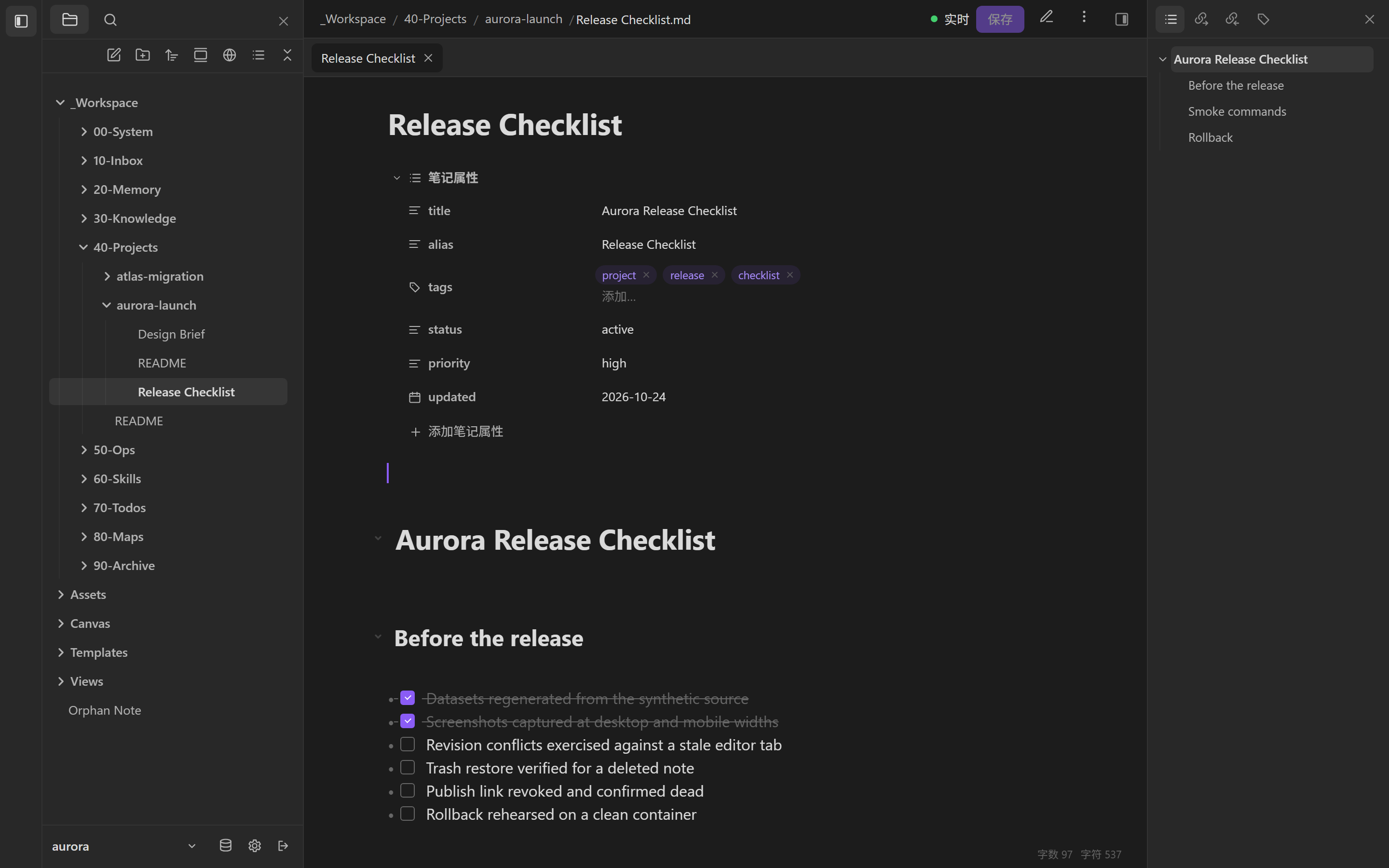
Three view modes — reading, source and live preview — share the same document. Properties come from frontmatter and can be edited in place. Writes carry a revision, so a stale tab is rejected instead of silently overwriting a newer note.

阅读、源码、实时预览三种视图共享同一份文档。属性直接来自 frontmatter,可就地编辑。写入携带 revision,过期标签页会被拒绝,而不是静默覆盖新内容。

  • Explorer in tree or flat mode, with per-folder note creation.
  • Revision-aware writes that refuse stale editors.
  • Attachments and themes served from the vault itself.
  • 文件树支持树状/平铺,可按目录新建笔记。
  • 写入带 revision,过期编辑器会被拒绝。
  • 附件与主题直接从 Vault 提供。
Live preview editor with properties, tasks and headings
Live preview, properties and tasks in one surface.实时预览、属性与任务在同一界面。06
II

Memory

记忆

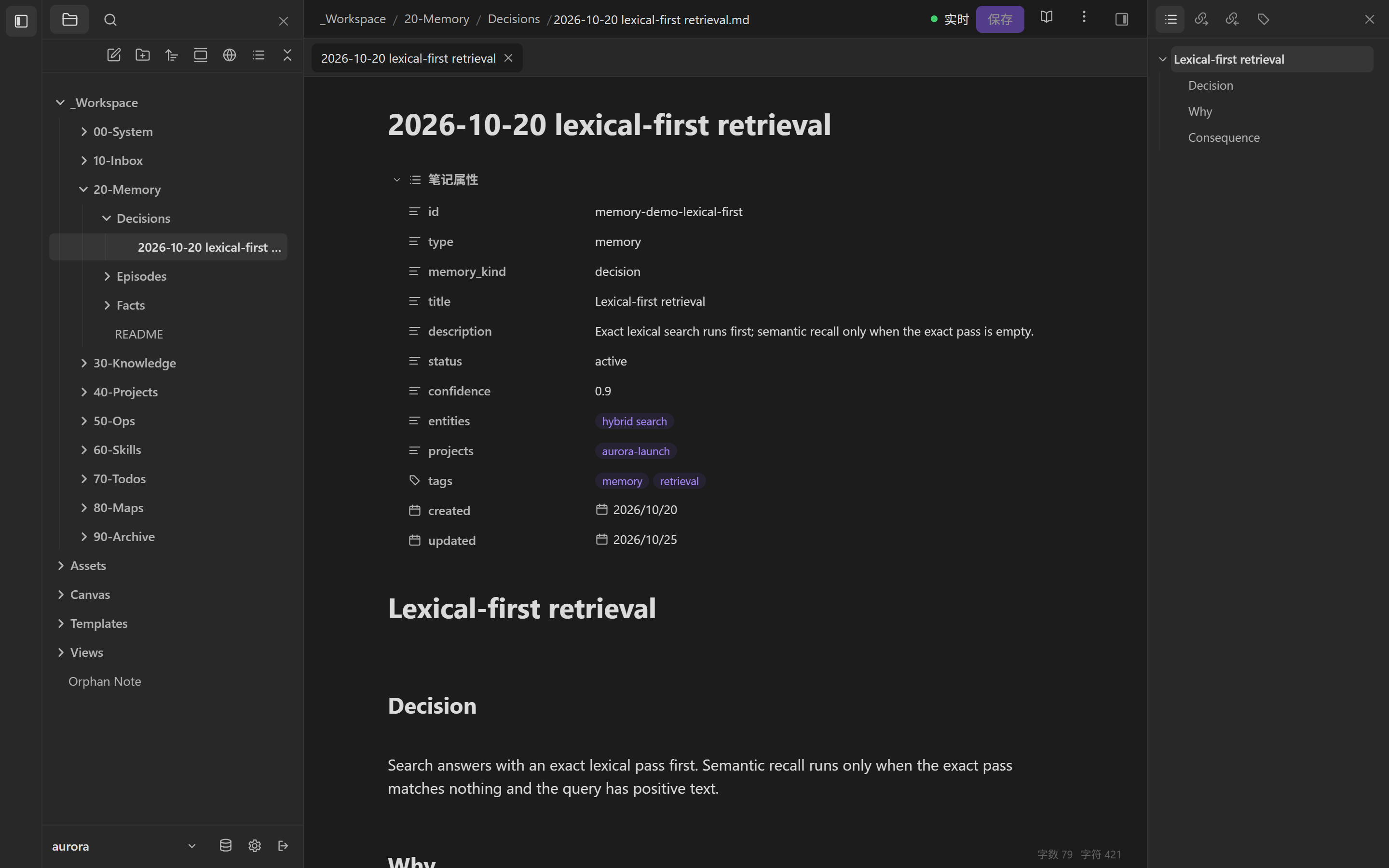
Durable memory is a folder of typed Markdown: decisions, facts, episodes and preferences. Each note carries its kind, confidence, entities and project links, so recall can explain itself.

长期记忆是带类型的 Markdown:决策、事实、片段、偏好。每条都有 kind、置信度、实体和项目关联,召回结果可以解释。

Memory is managed under _Workspace/20-Memory, but it never restricts free-form notes elsewhere. Capture and recall are MCP tools; the underlying records stay ordinary files you can open, diff and link.

记忆统一放在 _Workspace/20-Memory,但不会限制 Vault 其他区域的自由笔记。捕获与召回是 MCP 工具;底层仍是可打开、可 diff、可链接的普通文件。

  • memory_capture for structured records; the agent contract forbids full transcripts.
  • memory_recall with lexical and optional semantic signals.
  • Typed frontmatter: kind, status, confidence, entities, projects.
  • memory_capture 只写结构化记录;Agent 契约禁止保存整段对话。
  • memory_recall 支持词法与可选语义信号。
  • 类型化 frontmatter:kind、status、confidence、entities、projects。

A decision you can read six months later is worth more than a vector you cannot inspect.

半年后还能读懂的决策,比一个无法检查的向量更有价值。

A managed memory note showing memory_kind, confidence, entities and projects
One decision, one file, with its metadata intact.一个决策一个文件,元数据完整保留。02
III

Skills

Skill

Skills are directory packages with a SKILL.md and optional references, scripts and assets. They are validated, matched and exported as files — matching never executes one.

Skill 是目录包:SKILL.md 加可选的 references、scripts、assets。可校验、可匹配、可打包导入导出;匹配到 Skill 不等于执行。

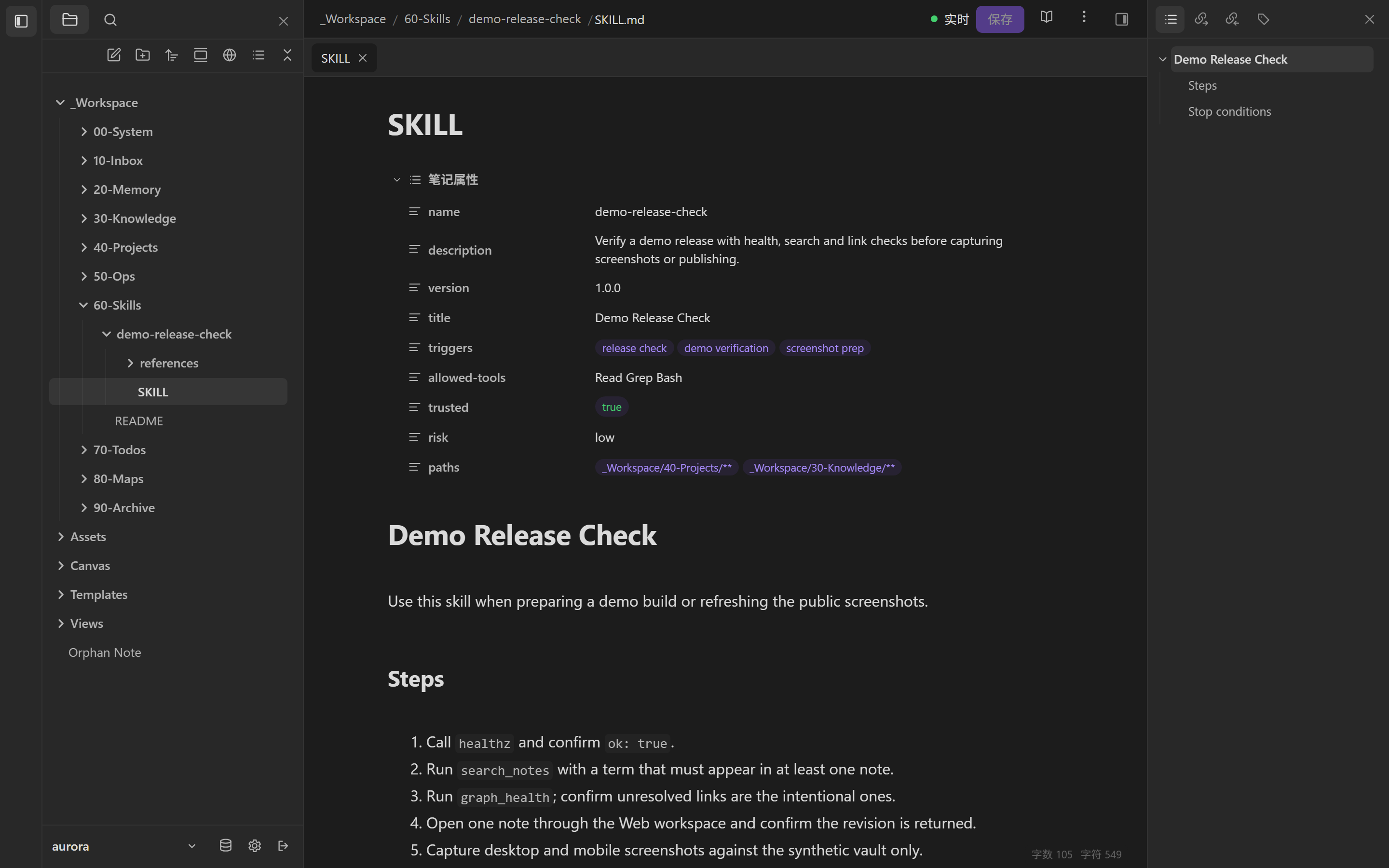
A skill declares its triggers, allowed tools, trust and risk. Validation checks names, metadata and package paths. Import and export use zip archives with path-traversal checks.

Skill 声明 triggers、allowed-tools、trust 与 risk。校验会检查命名、元数据和包路径;导入导出使用 zip,并做路径穿越检查。

  • Portable agent-skills package layout.
  • Validated before it is offered to a host.
  • No side effects: match returns executionAuthorized: false.
  • 可移植的 agent-skills 包结构。
  • 先校验再提供给宿主。
  • 无副作用:匹配返回 executionAuthorized: false。
SKILL.md with triggers, allowed tools, trust flag and steps
A SKILL.md you can review before you trust it.先审阅 SKILL.md,再决定是否信任。03
IV

Search and reading

检索与阅读

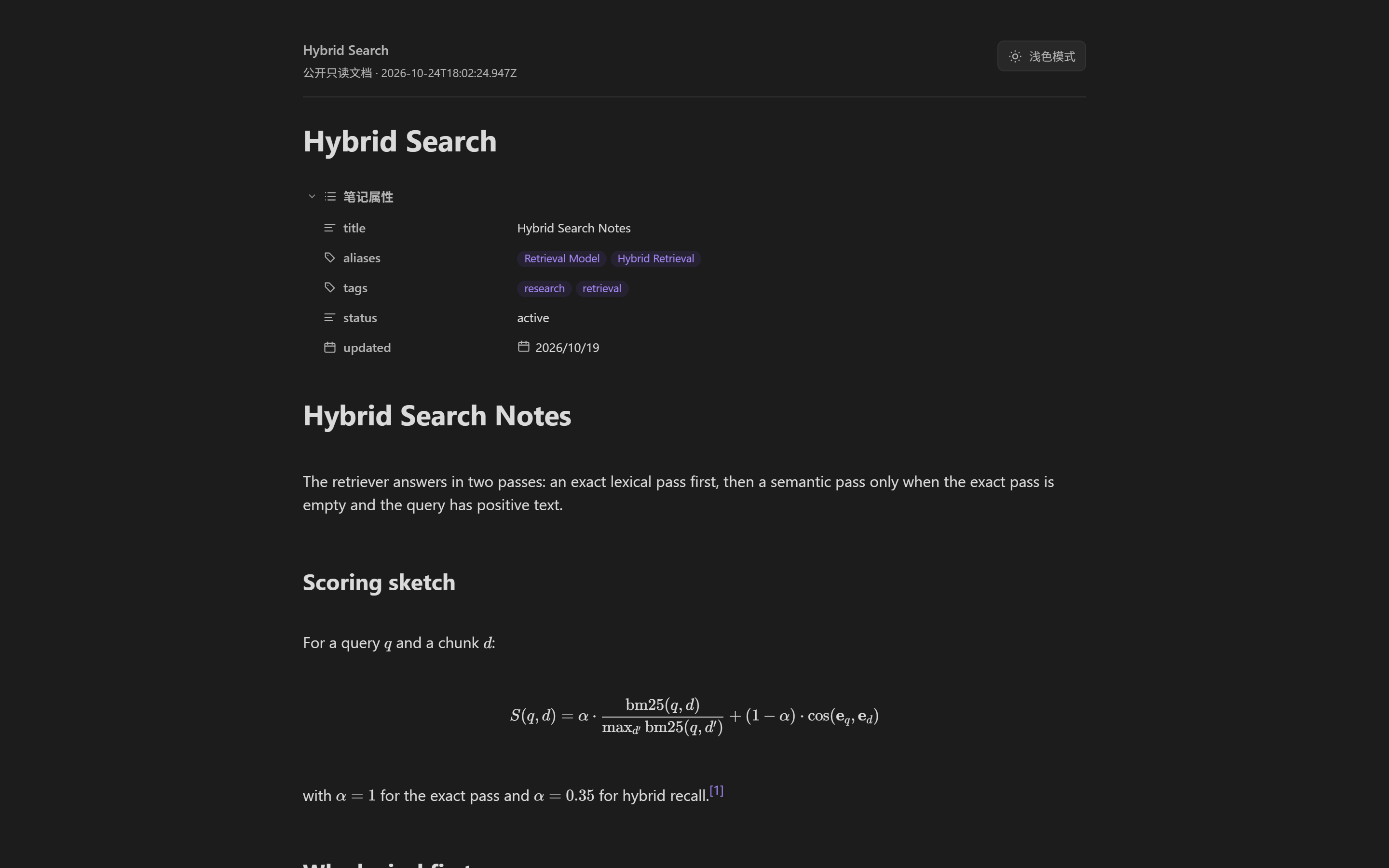
Search runs an exact lexical pass first, with semantic recall as a fallback. Results carry snippets, match counts and reasons. The reader renders Markdown, KaTeX, Mermaid, tables and footnotes from the vault itself.

检索先精确匹配,语义召回只作为回退;结果带片段、命中数和原因。阅读视图直接从 Vault 渲染 Markdown、KaTeX、Mermaid、表格和脚注。

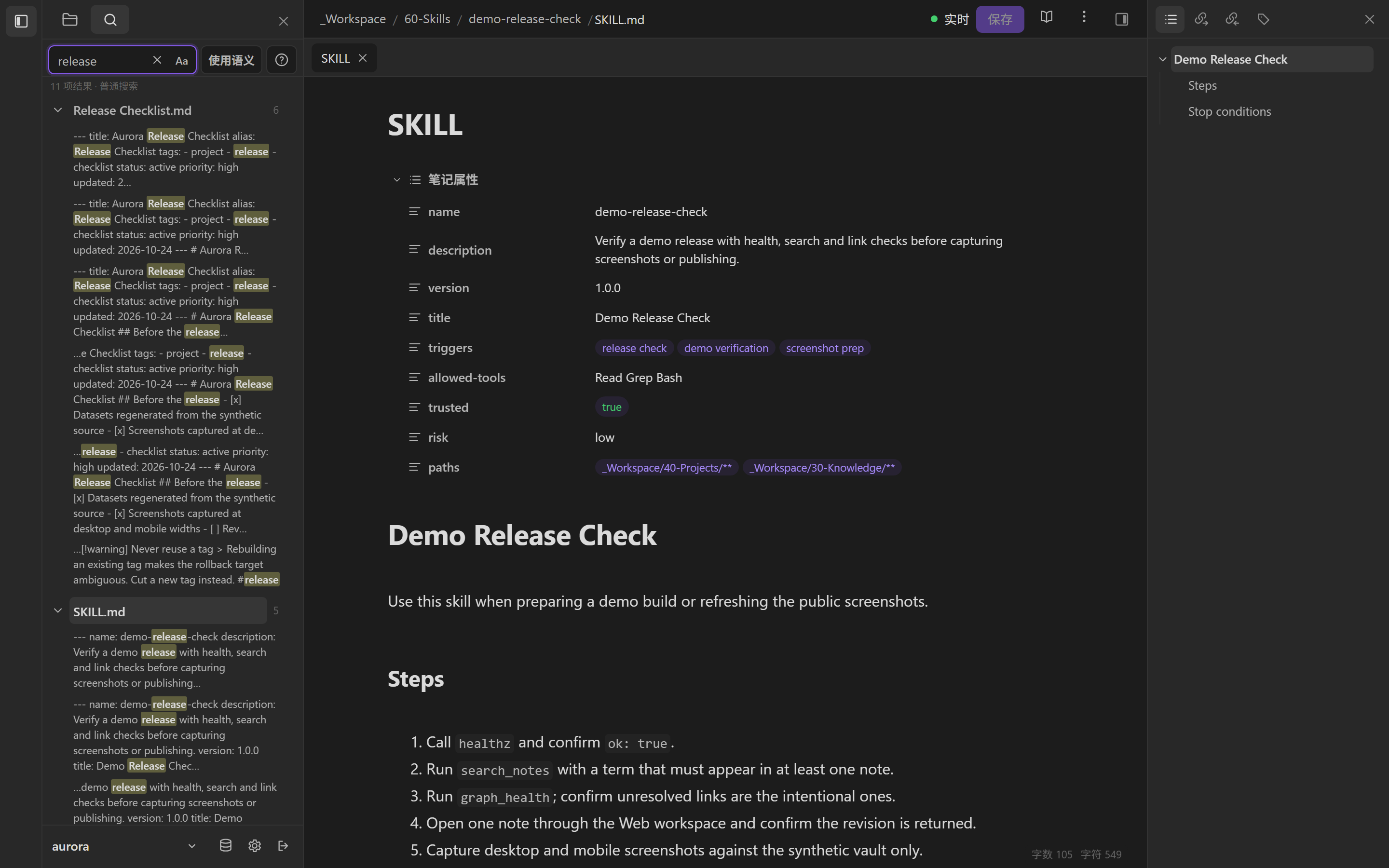
The ranking is explainable: each hit includes score, reasons, matchCount and the lines that matched. By default, semantic retrieval is optional and only escalates when the exact pass is empty.

排序是可解释的:每个命中都带 score、reasons、matchCount 和命中的原文行。默认情况下,语义检索是可选项,只在精确结果为空时升级。

  • Lexical-first for identifiers, paths, tags and aliases.
  • Hybrid fallback through an optional embedding service.
  • Local rendering for math and diagrams; no external CDN.
  • 先词法,适合标识符、路径、标签和别名。
  • 混合回退,可选接入 embedding 服务。
  • 本地渲染公式与图表,不依赖外部 CDN。
Search results with highlighted snippets
Snippets with reasons.带原因的命中片段。04
Reader rendering a KaTeX formula and a footnote
KaTeX and footnotes.KaTeX 与脚注。05
V

Bases

Bases

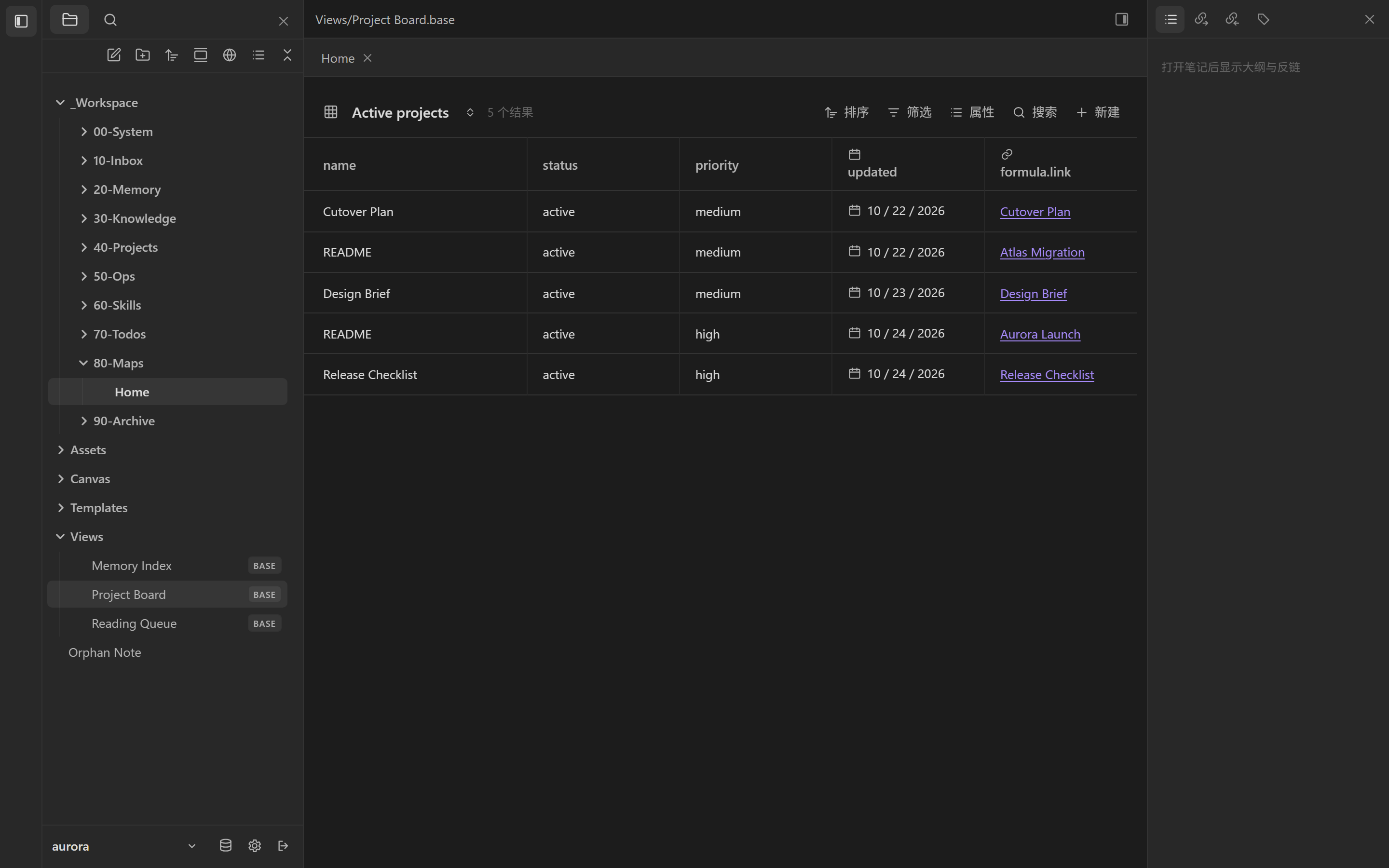
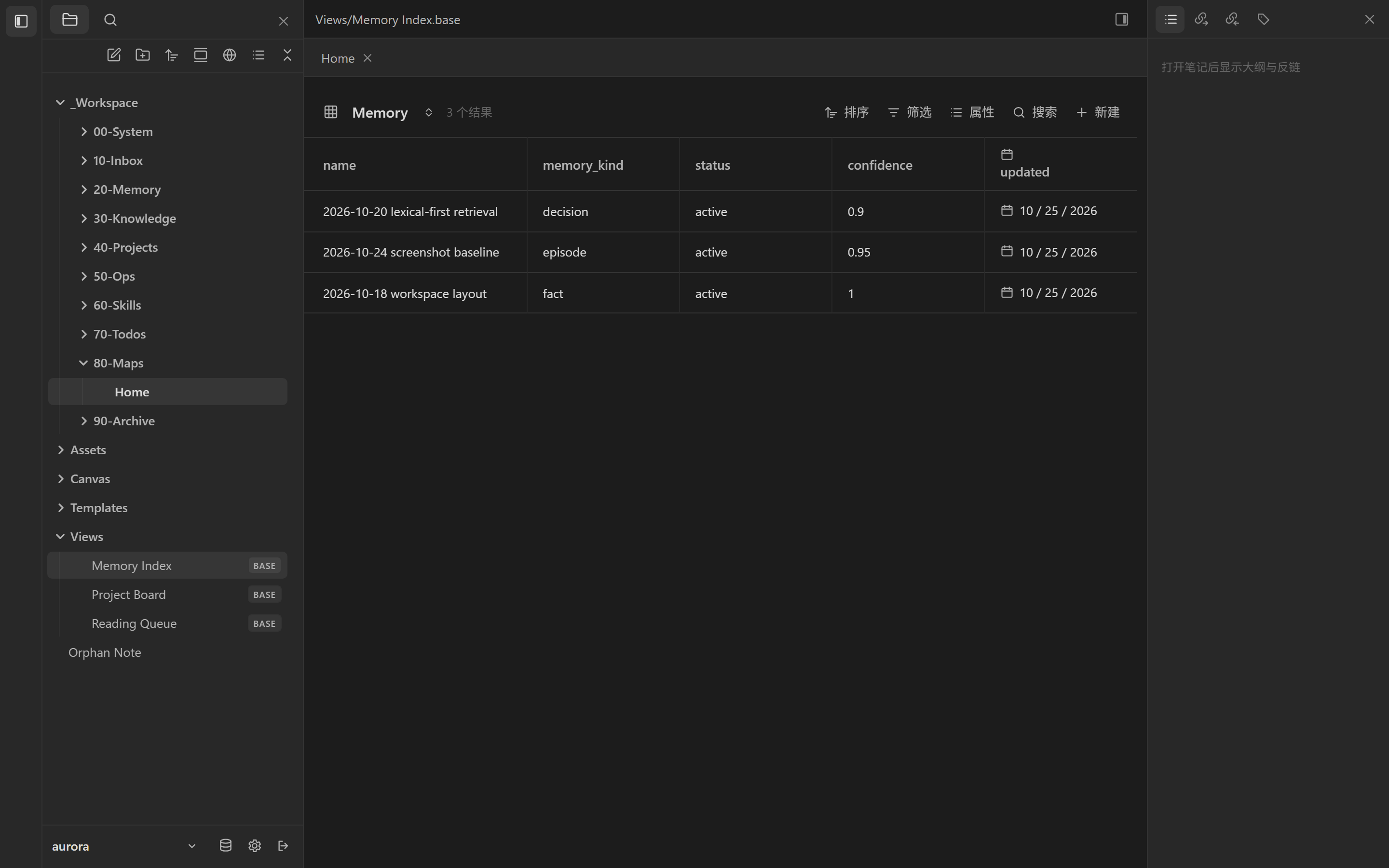
Bases stay in the vault as .base files. Filters, sort, views and a narrow formula subset are evaluated safely; unsupported expressions fail closed instead of running JavaScript.

.base 文件留在 Vault 里,支持筛选、排序、视图和受限公式子集;不支持的表达式直接拒绝,不执行任意 JavaScript。

Projects and memory become live tables without a second schema. The view definitions are versionable files, and the same query surface is available to agents through MCP.

项目与记忆不需要第二套 schema 就能变成实时表格。视图定义本身是可版本化的文件,Agent 也能通过 MCP 使用同一套查询面。

  • Project board filtered by tag, sorted by priority.
  • Memory index built from typed frontmatter.
  • Fail-closed on unknown filters and formulas.
  • 项目板按标签筛选、按优先级排序。
  • 记忆索引直接来自类型化 frontmatter。
  • Fail closed:未知筛选与公式直接拒绝。
Bases table of active projects with status and priority
Projects as a live view.项目实时视图。07
Bases memory table with kind, status and confidence
Memory as a live view.记忆实时视图。08
VI

Publish

发布

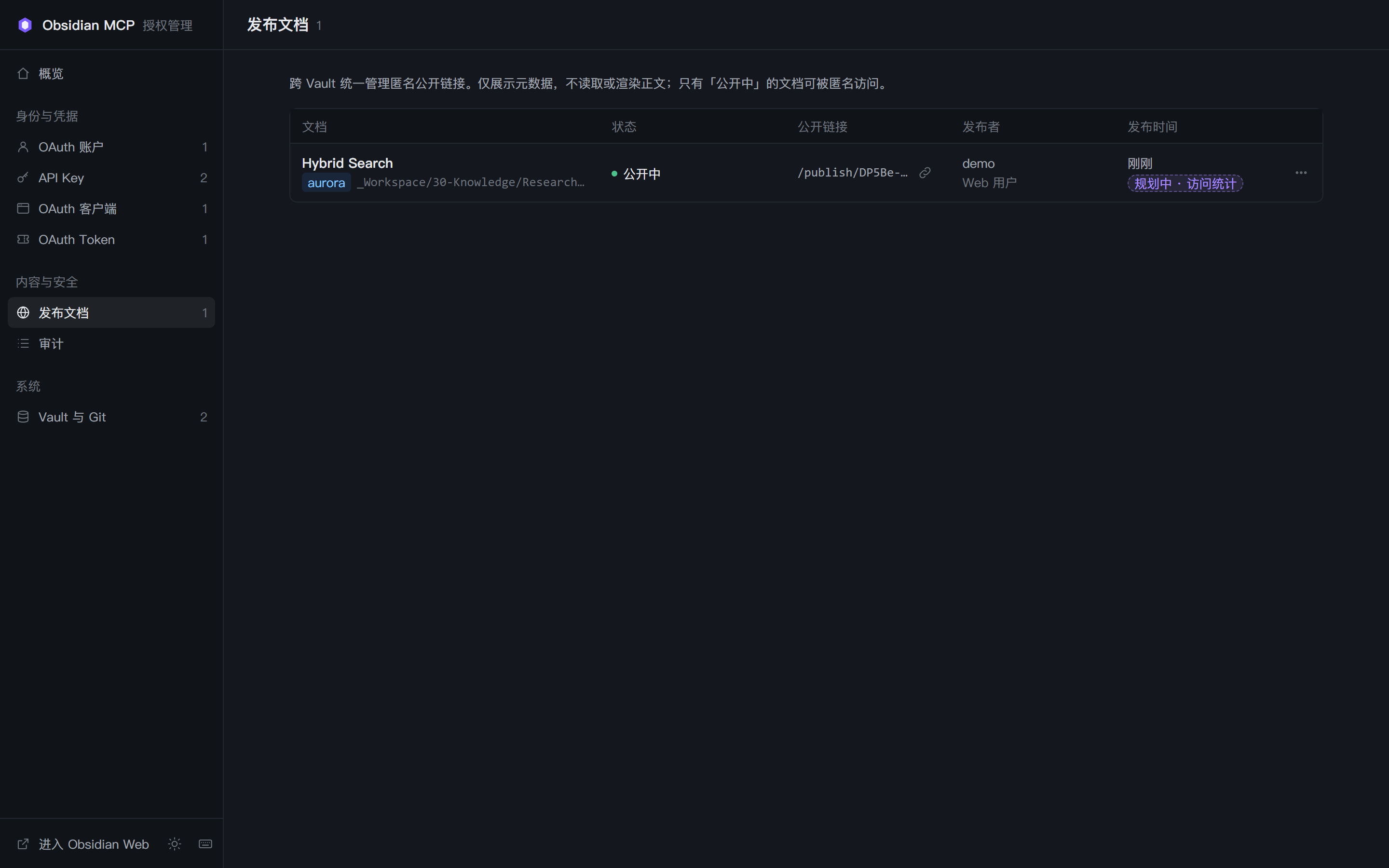
Publish one note to a read-only page and revoke the link later. The source note is untouched, and the catalogue records vault, path and time.

把单篇笔记发布成只读页面,之后可以撤销链接;原笔记不受影响,目录记录 Vault、路径和时间。

This is a narrow sharing primitive, not a clone of Obsidian Publish. It is per document, independent of the official service, and manageable from both the workspace and the admin console.

它是窄范围的分享能力,不是 Obsidian Publish 的复制品。按文档发布、独立于官方服务,并可在工作区与 Admin 两侧管理。

  • Anonymous read-only public page.
  • Revocable without deleting the source.
  • Cross-vault catalogue with publication time.
  • 匿名只读公开页。
  • 可撤销,不删除原文。
  • 跨库发布目录记录发布时间。
A published read-only note page
A published note, with its properties and math intact.发布后的笔记,属性与公式完整保留。09
VII

Several vaults

多 Vault

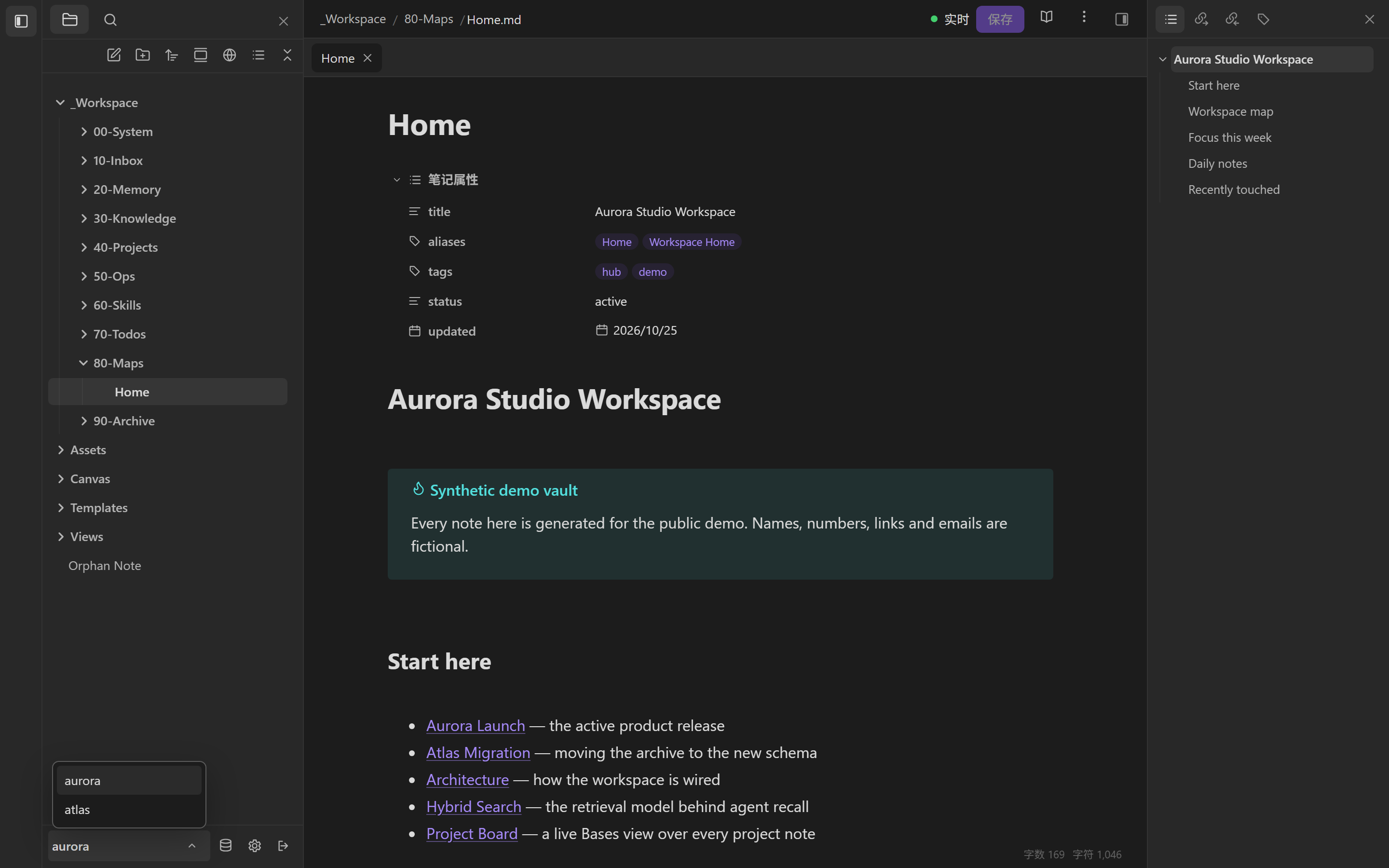
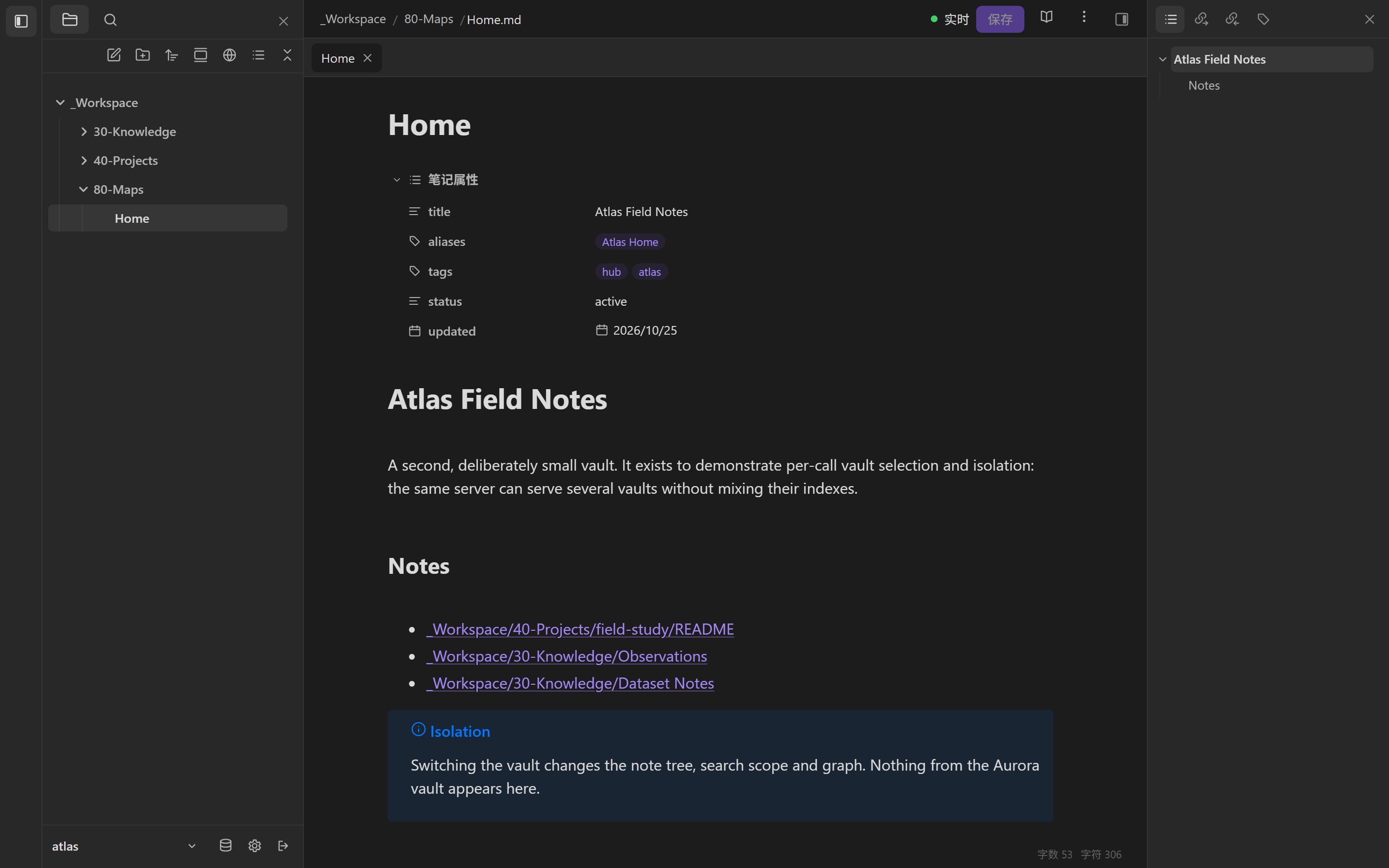
One server, several vaults. Agents select a vault per call with vaultId; the browser session switches vaults and keeps its own tree, search scope and allowlist.

一个服务器,多个 Vault。Agent 按调用传 vaultId,浏览器会话可以切换 Vault;文件树、搜索范围和账户白名单各自独立。

Each vault gets its own catalog and index. A search in one vault cannot cite another, and the admin allowlist decides which accounts see which vault at all.

每个 Vault 有独立的目录与索引:一个库里的搜索不会引用另一个库;账户能看到哪些 Vault 由 Admin 白名单决定。

  • Per-call scoping for agents working across projects.
  • Per-account allowlist enforced at session and admin layers.
  • Isolated catalogs so indexes never bleed.
  • 按调用指定,适合跨项目的 Agent。
  • 账户级白名单,在会话与 Admin 两层校验。
  • 目录隔离,索引不串库。
Vault switcher showing aurora and atlas
Switch vaults in the session.会话内切换 Vault。10
Second vault with an isolated tree
A second vault, a separate tree.第二个 Vault,独立的文件树。11
VIII

Theme

主题

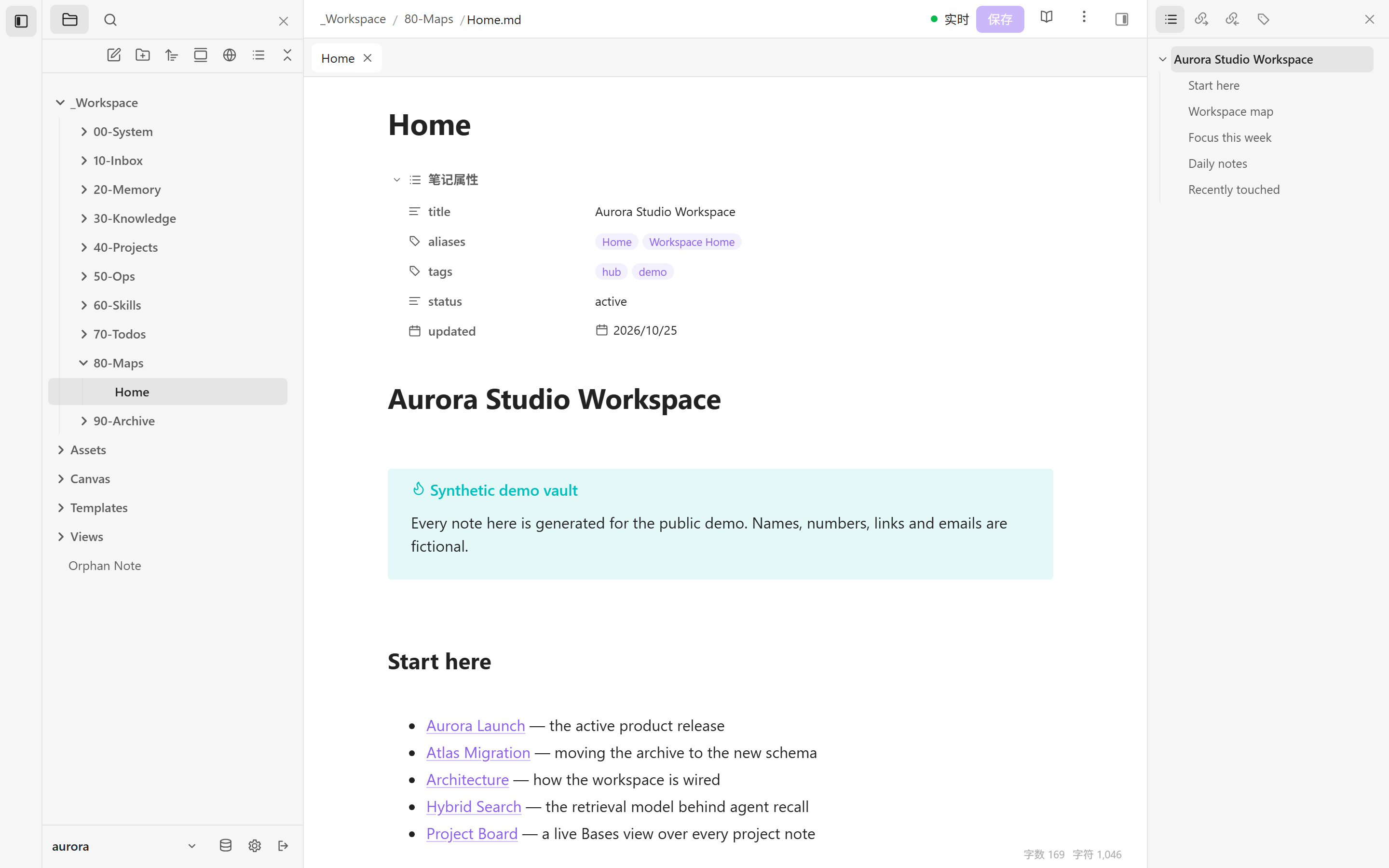
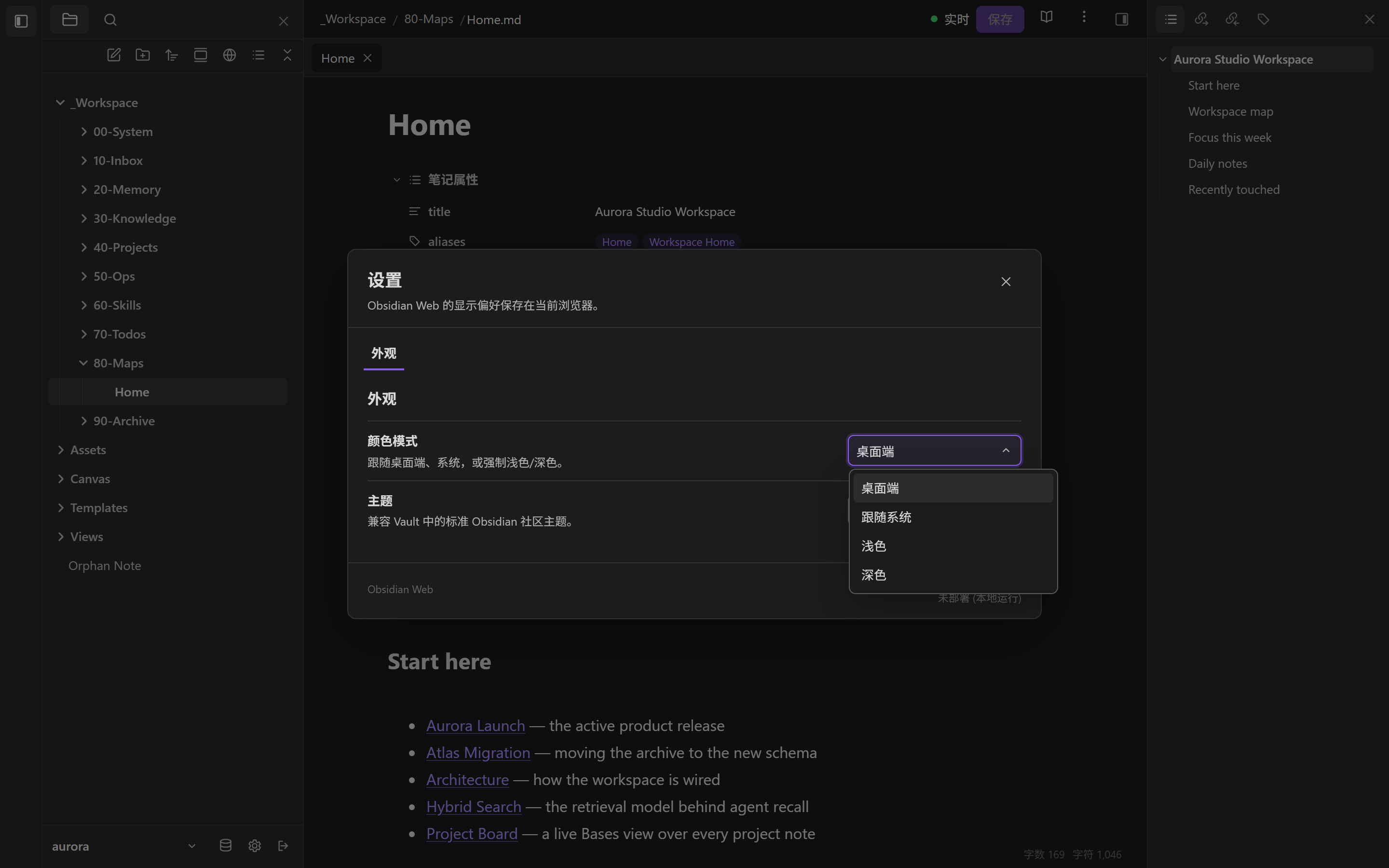
Follow the desktop, follow the system, or force light or dark. Vault community themes are supported too.

跟随桌面端、跟随系统,或强制浅色/深色;也支持 Vault 的社区主题。

The same reading surface, at whatever contrast you need. The preference is saved per browser, and a vault’s own theme CSS can replace the default look.

同一个阅读界面,按你需要的对比度呈现。偏好保存在当前浏览器;Vault 自带的主题 CSS 可以替换默认外观。

  • Desktop / system / light / dark color modes.
  • Vault themes through standard Obsidian theme files.
  • Saved locally, not in the vault.
  • 桌面端 / 系统 / 浅色 / 深色四种模式。
  • Vault 主题兼容标准 Obsidian 主题文件。
  • 本地保存,不写入 Vault。
The same workspace in light mode
Light mode.浅色模式。20
Theme settings with color mode options
Color mode and vault theme.颜色模式与 Vault 主题。21
IX

Admin

管理

A separate admin surface with its own password: scoped API keys, OAuth accounts, dynamic clients, access and refresh grants, publish records and a secret-free audit log.

独立的管理面板,使用独立密码:带 scope 的 API Key、OAuth 账户、动态客户端、访问/刷新授权、发布目录,以及不含秘密值的审计日志。

Credentials are scoped to read, write and files, and bound to an explicit vault allowlist. The audit records the actor, credential type, source and outcome — never the credential value.

凭据按 read、write、files 分权,并绑定明确的 Vault 白名单。审计记录操作者、凭据类型、来源和结果,但不记录凭据值。

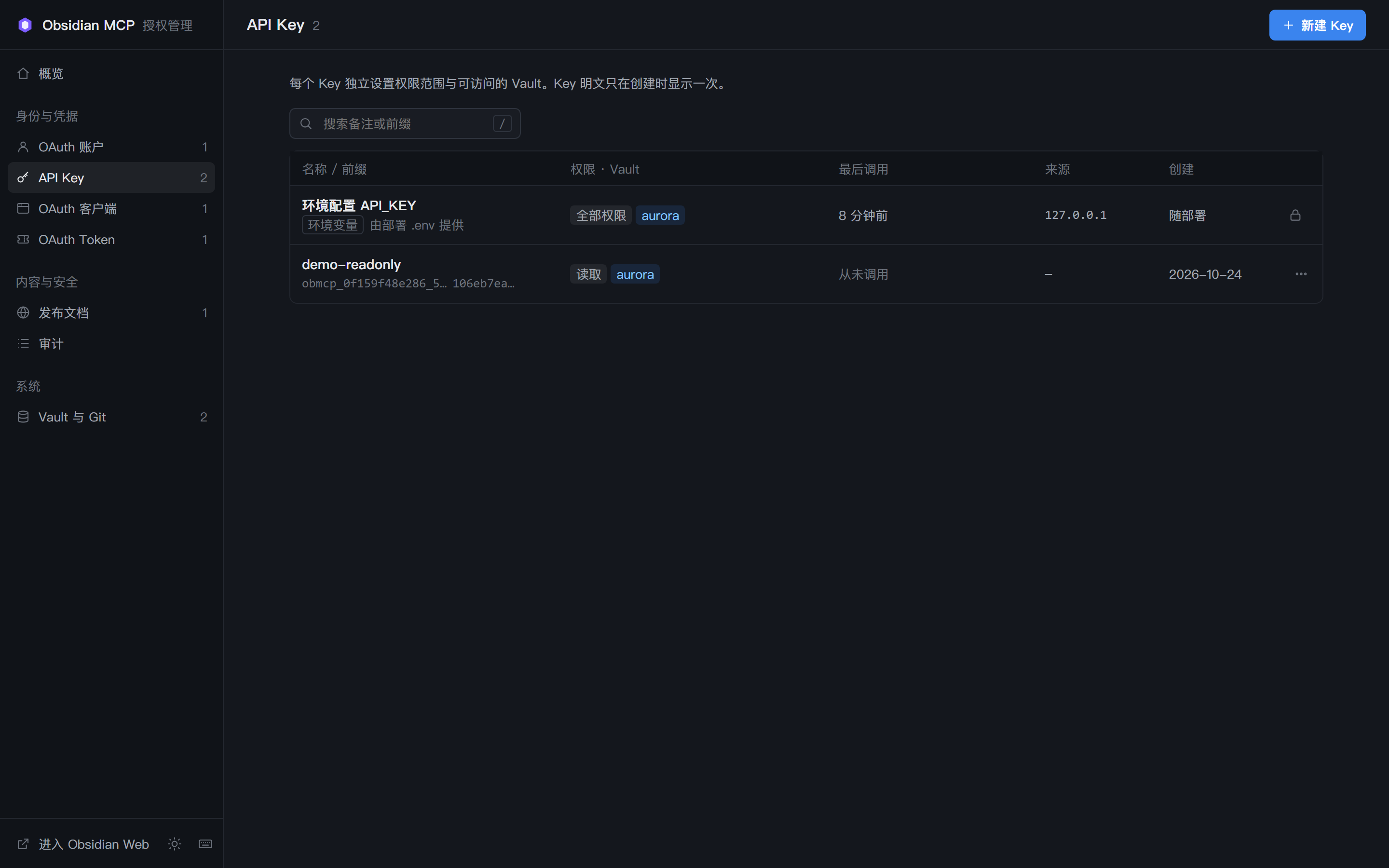
  • API keys with scopes and vault allowlists.
  • OAuth 2.1 + PKCE grants with rotation and revocation.
  • Audit with action, agent, source and outcome.
  • API Key 带 scope 与 Vault 白名单。
  • OAuth 2.1 + PKCE,支持轮换与撤销。
  • 审计记录动作、Agent、来源和结果。
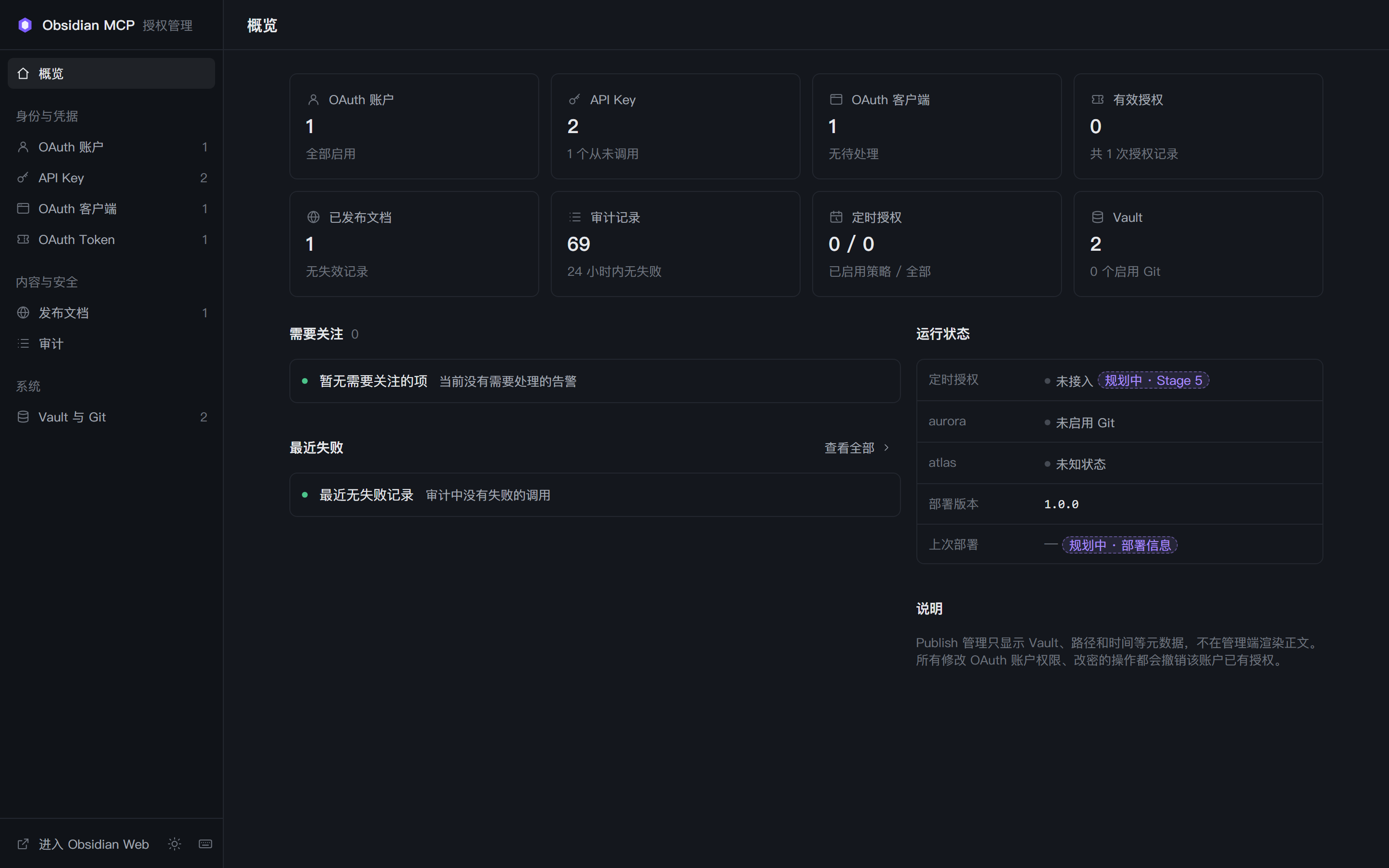
Admin overview with credential and audit counts
Overview and runtime state.概览与运行状态。13
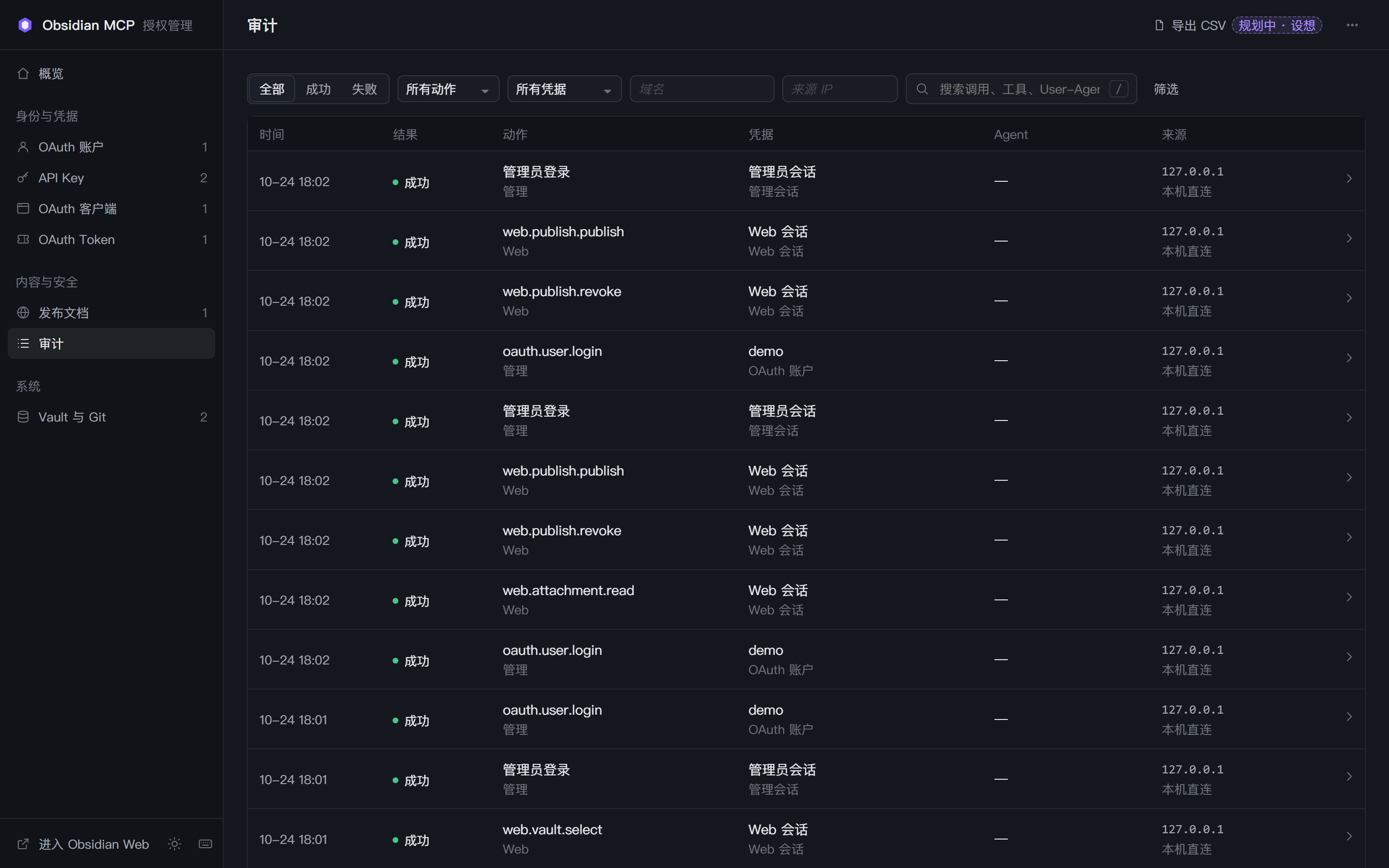
Admin audit log
A secret-free audit trail.不含秘密值的审计记录。19
X

Mobile

移动端

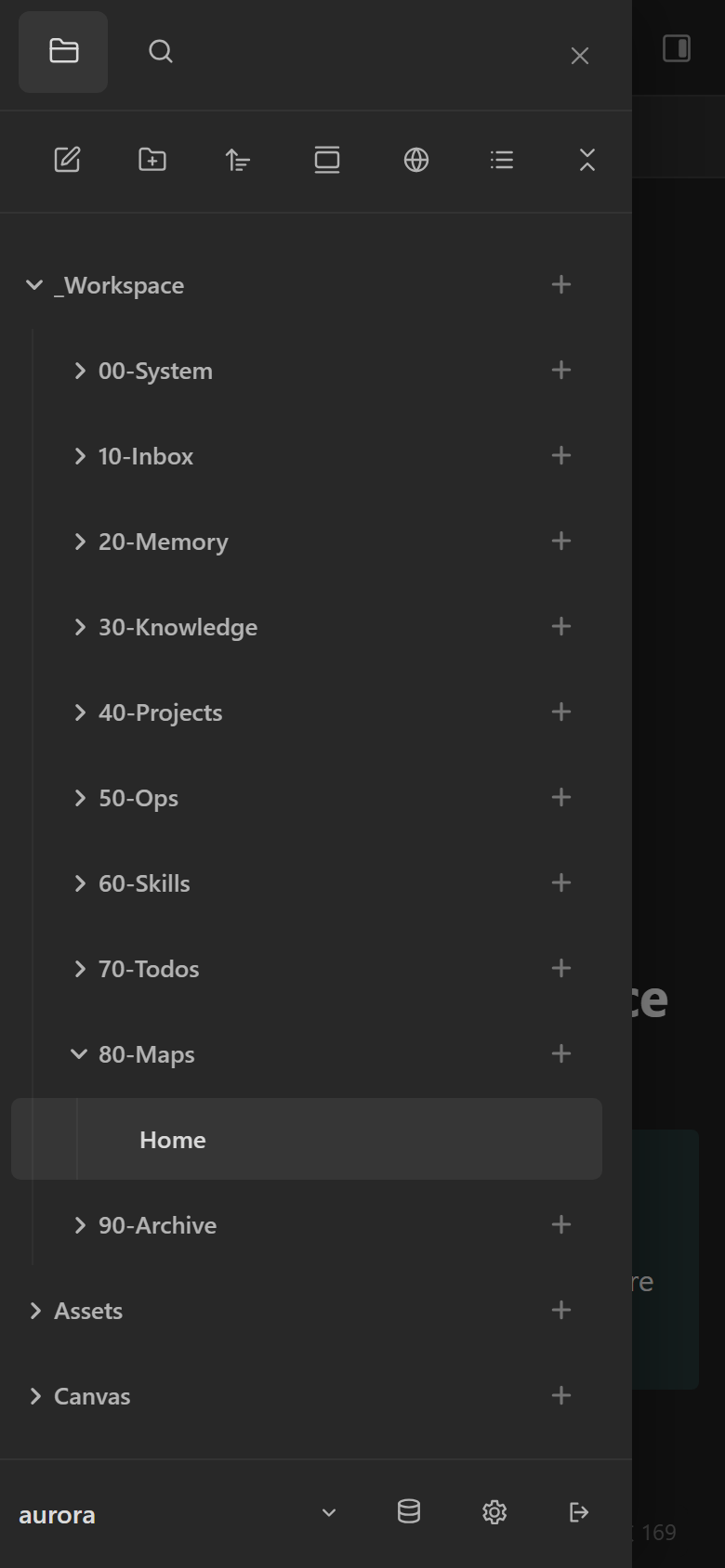
The shell collapses into a drawer without losing the tree, search, reader or editor. The same routes, auth and workspace on a phone.

移动端把文件树收进抽屉,但搜索、阅读、编辑和路由都保留;手机上是同一套认证与工作区。

It is not a stripped-down viewer. The full folder tree is in the drawer, and a web app manifest ships with the shell. Installable PWA support is still on the roadmap.

它不是删减版查看器:完整文件树在抽屉里;随应用提供 Web App Manifest,可安装 PWA 仍在路线图中。

  • Full tree in a touch drawer.
  • Same routes and auth as desktop.
  • Web app manifest; installable PWA is planned, not shipped.
  • 完整文件树收进触摸抽屉。
  • 同一路由与认证。
  • Web App Manifest;可安装 PWA 仍在规划中,尚未交付。
Mobile layout with the folder tree drawer open
The same workspace, 390 pixels wide.同一工作区,390 像素宽。12

Specimen · selected fields from the local demo

标本 · 本地演示实例的选定字段

What the agent actually sees.

Agent 实际看到什么。

A standard Streamable HTTP MCP endpoint: initialize, list tools, call one. Paths below are vault-relative; absolute host paths are deliberately omitted.

标准的 Streamable HTTP MCP 端点:初始化、列工具、调用。下面只出现 Vault 相对路径,刻意省略本机绝对路径。

Search explains its ranking

检索会解释排序

Real response, truncated. The top hit carries the exact score and the reason it matched.

真实响应,已截断。首个命中带精确分数和命中原因。

JSON-RPC · streamable HTTPdemo
→ initialize
{ "jsonrpc": "2.0", "id": 1, "method": "initialize",
  "params": { "clientInfo": { "name": "demo-agent" } } }

← serverInfo
{ "name": "obsidian-mcp-server", "version": "1.0.0" }

→ tools/list
← 87 tools

→ tools/call search_notes
{ "name": "search_notes",
  "arguments": { "query": "release", "limit": 3 } }

← top result (truncated)
{ "path": "_Workspace/40-Projects/aurora-launch/README.md",
  "score": 1.30, "matchCount": 6,
  "reasons": ["exact", "query:release"] }

Memory and skills are files with a contract

记忆与 Skill 是有契约的文件

Recall returns a path, typed metadata and a score. Skill matching returns validation and trust, never an execution.

召回返回路径、类型化元数据和分数;Skill 匹配返回校验与信任状态,绝不执行。

memory_recall + skill_matchdemo
// memory_recall
{ "query": "retrieval decision",
  "results": [{
    "path": "_Workspace/20-Memory/Decisions/2026-10-20 lexical-first retrieval.md",
    "score": 0.925,
    "metadata": { "memoryKind": "decision", "status": "active" },
    "reasons": ["lexical:1.000", "metadata:0.500"] }] }

// skill_match
{ "matches": [{
    "skill": "demo-release-check", "score": 0.661,
    "validation": { "valid": true }, "trusted": true }],
  "executionAuthorized": false }
graph_healthdemo vault
{ "notes": 31, "links": 75,
  "counts": { "resolved": 67, "unresolved": 2, "attachment": 6 },
  "orphans": { "count": 4 },
  "issues": [
    { "raw": "[[Nonexistent Note]]" },
    { "raw": "[[Design System Archive]]" } ] }
87

Grouped by the job, not by the transport.

按任务分组,而不是按传输层分组。

Counts come from the live tools/list response. The discovery profile can be narrowed for small-context hosts.

数量来自真实 tools/list 响应。宿主上下文紧张时,可以裁剪发现配置。

Memory & context记忆与上下文5

agent_bootstrapserver_infoget_note_contextmemory_capturememory_recall

SkillsSkill5

skill_listskill_matchskill_validateskill_exportskill_import

Notes笔记14

get_noteget_metadatawrite_noteappend_to_notepatch_notereplace_in_notemanage_frontmattermanage_tagslist_noteslist_recentlist_aliaseslist_propertiesrename_propertyset_property_type

Search & index检索与索引7

search_notesrecallfind_relatedsuggest_linkslist_tagsindex_statusreindex_vault

Links & graph链接与图谱6

get_backlinksget_graphget_unresolved_linksget_orphansget_deadendsgraph_health

Files & transfer文件与传输13

list_filespull_note_fileget_filepull_filewrite_filestart_file_uploadupload_file_chunkfile_upload_statuscancel_file_uploadcreate_archiveinspect_archiveread_archive_entryextract_archive

Structure结构3

manage_foldersmove_notedelete_note

Versions & trash版本与回收站8

list_trashrestore_from_trashlist_versionsdelete_trash_entryrestore_versiondelete_versionget_note_versioncompare_note_versions

Plans变更计划7

plan_restore_from_trashplan_restore_versionplan_delete_noteplan_move_noteplan_note_changesget_note_planapply_note_plan

Daily, tasks, templates日常、任务、模板5

daily_notelist_templatescreate_from_templatelist_tasksupdate_task

Bases & canvasBases 与 Canvas6

list_basesget_basewrite_basequery_baseget_canvaswrite_canvas

Publish发布2

get_publish_statusmanage_publish

GitGit6

git_statusgit_diffgit_loggit_commitgit_pullgit_push
‡

Writes are the dangerous part.

写入是最危险的部分。

The server assumes an agent can be wrong, a tab can be stale, and a path can escape. The defaults are built around those failures.

服务端默认假设:Agent 可能出错,标签页可能过期,路径可能逃逸。默认行为围绕这些故障设计。

OAuth 2.1 + PKCE

OAuth 2.1 + PKCE

Authorization-code flow with discovery, dynamic client registration, refresh rotation and revocation. Scoped API keys remain available.

授权码流程,含发现、动态客户端注册、刷新轮换与撤销;同时保留受限 API Key。

Scope and vault allowlist

Scope 与 Vault 白名单

Read, write and files permissions are separate, and every credential is bound to explicit vaults.

read、write、files 权限分离,每个凭据绑定明确的 Vault。

Optimistic concurrency

乐观并发

Reads return a SHA-256 revision. Stale writes must fail instead of merging silently.

读取返回 SHA-256 revision;过期写入必须失败,而不是静默合并。

Path containment

路径约束

Traversal and symlink escapes are rejected, root deletion is refused, and writes are atomic.

拒绝路径穿越与符号链接逃逸,拒绝删除根目录,写入原子化。

Versions, trash, journal

版本、回收站、Journal

Pre-write versions and recoverable trash live outside the vault; multi-note plans are journaled.

写入前版本与可恢复回收站放在 Vault 外;多笔记计划写入 journal。

Secret-free audit

不含秘密值的审计

Audit records the actor, credential type, source and outcome — never the credential itself.

审计记录操作者、凭据类型、来源和结果,绝不记录凭据本身。

Read-only mode

只读模式

One switch stops all vault writes while health, search and reads keep working.

一个开关停止所有 Vault 写入,健康检查、搜索和读取继续工作。

Bounded inputs

有界输入

Read, transfer, archive and search limits are explicit; unsupported Base expressions fail closed.

读取、传输、归档与搜索都有显式上限;不支持的 Base 表达式直接拒绝。

→

Bring your own vault. Or start from the demo.

带上你的 Vault,或从演示库开始。

The demo is fully synthetic. Mount it, or point the container at your own vault at /vault.

演示库完全合成。可以直接挂载它,或把自己的 Vault 挂到容器 /vault。

1 · Run the server

1 · 启动服务

shelldocker compose
# public snapshot
git clone https://github.com/OhiyoX/obsidian-mcp-server-public.git
cd obsidian-mcp-server-public
cp .env.example .env

# mount the synthetic demo (or your own vault)
export OBSIDIAN_VAULT_PATH="$PWD/demo/vaults/aurora"
export OBSIDIAN_VAULTS_ROOT="$PWD/demo/vaults"
export WEB_DEFAULT_VAULT=aurora
export VAULT_WORKSPACE_ROOT=_Workspace
docker compose up -d --build
curl http://127.0.0.1:18923/healthz

2 · Point a client at it

2 · 客户端接上

MCP client configstreamable HTTP
{
  "mcpServers": {
    "obsidian": {
      "type": "http",
      "url": "http://127.0.0.1:18923/mcp",
      "headers": { "X-API-Key": "<your-key>" }
    }
  }
}

The browser workspace is at /app; the admin console at /admin/auth. OAuth is optional and off by default.

浏览器工作区在 /app,管理面板在 /admin/auth。OAuth 可选,默认关闭。

The demo vault

演示 Vault

A two-vault synthetic workspace in the _Workspace layout: memory, projects, ops, skills, todos, maps and an archive. No production note was copied into it.

按 _Workspace 规范组织的双库合成工作区:记忆、项目、运维、Skill、待办、导航与归档。没有复制任何生产笔记。

demo-vault.zip aurora + atlas · Markdown, Bases, Canvas, assets aurora + atlas · Markdown、Bases、Canvas、附件
20-Memory1 decision, 1 fact, 1 episode with typed frontmatter1 条决策、1 条事实、1 条片段,均带类型化 frontmatter
40-Projects2 projects with README-as-current-state2 个项目,README 记录当前状态
60-Skills1 validated, trusted skill package + reference1 个已验证、受信任的 Skill 包 + reference
Views3 Bases views over projects, reading and memory3 个 Bases 视图:项目、阅读、记忆
Canvas1 JSON Canvas system map1 个 JSON Canvas 系统图

Plates from one local instance.

来自同一个本地实例的图版。

Desktop 1440×900, mobile 390×844, dark and light. The web UI is Chinese-localized in this build; note content is English. All data is synthetic. Click any plate to enlarge.

桌面 1440×900,移动 390×844,深浅两种主题。当前 Web UI 为中文界面,笔记内容为英文;所有数据均为合成。点击任意图版放大。

Workspace home
Workspace home工作区首页01
Managed memory note
Memory note记忆笔记02
Skill package
Skill packageSkill 包03
Search results with snippets
Lexical search词法检索04
Reader with math and footnotes
Reader: math阅读:公式05
Live preview editor
Live editor实时编辑器06
Bases project table
Bases: projectsBases:项目07
Bases memory table
Bases: memoryBases:记忆08
Published read-only page
Published page发布页09
Vault switcher
Vault switch切换 Vault10
Second vault
Second vault第二个 Vault11
Mobile drawer
Mobile shell移动端12
Admin overview
Admin overviewAdmin 概览13
Admin API keys
API keysAPI Key14
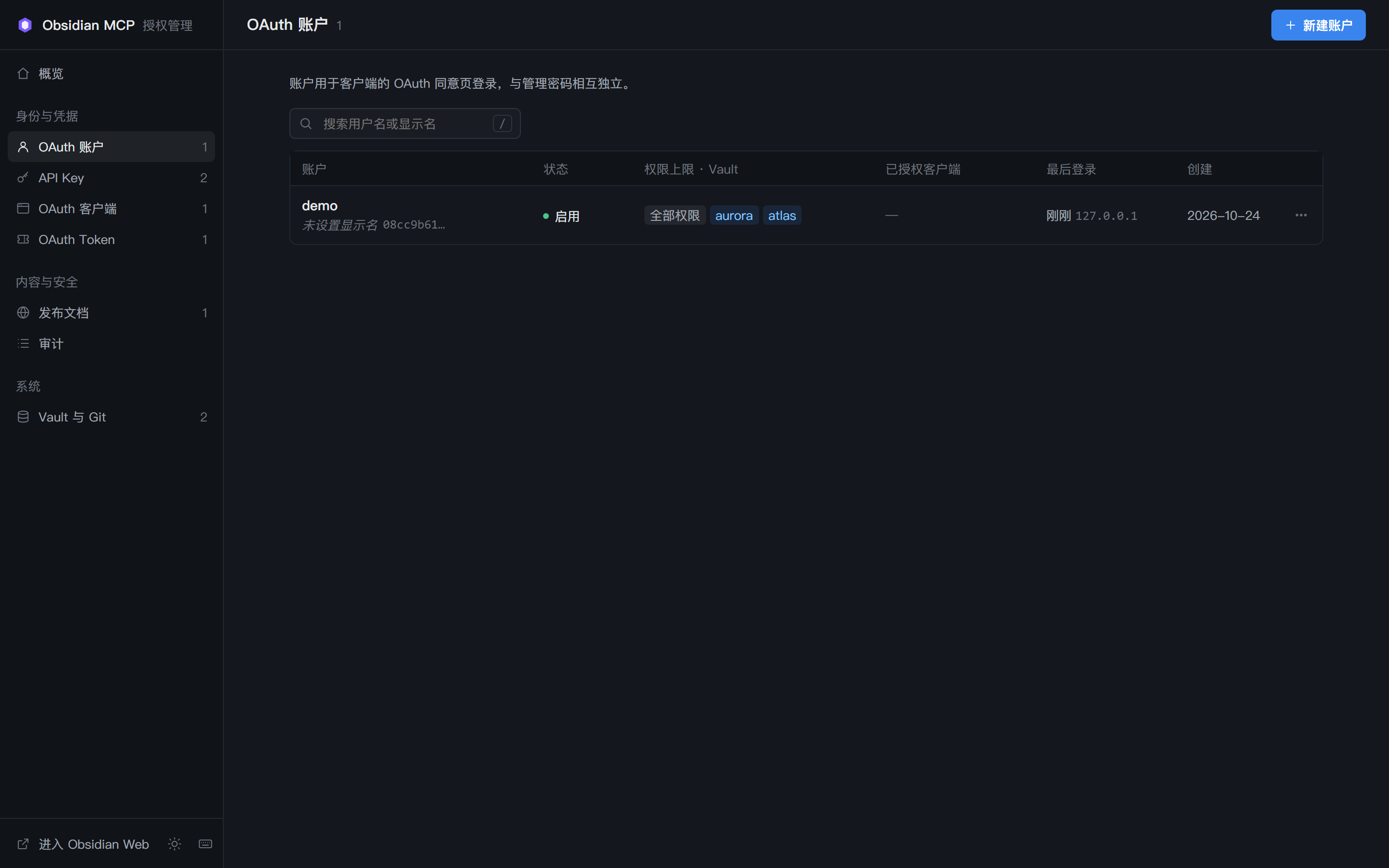
Admin OAuth accounts
OAuth accountsOAuth 账户15
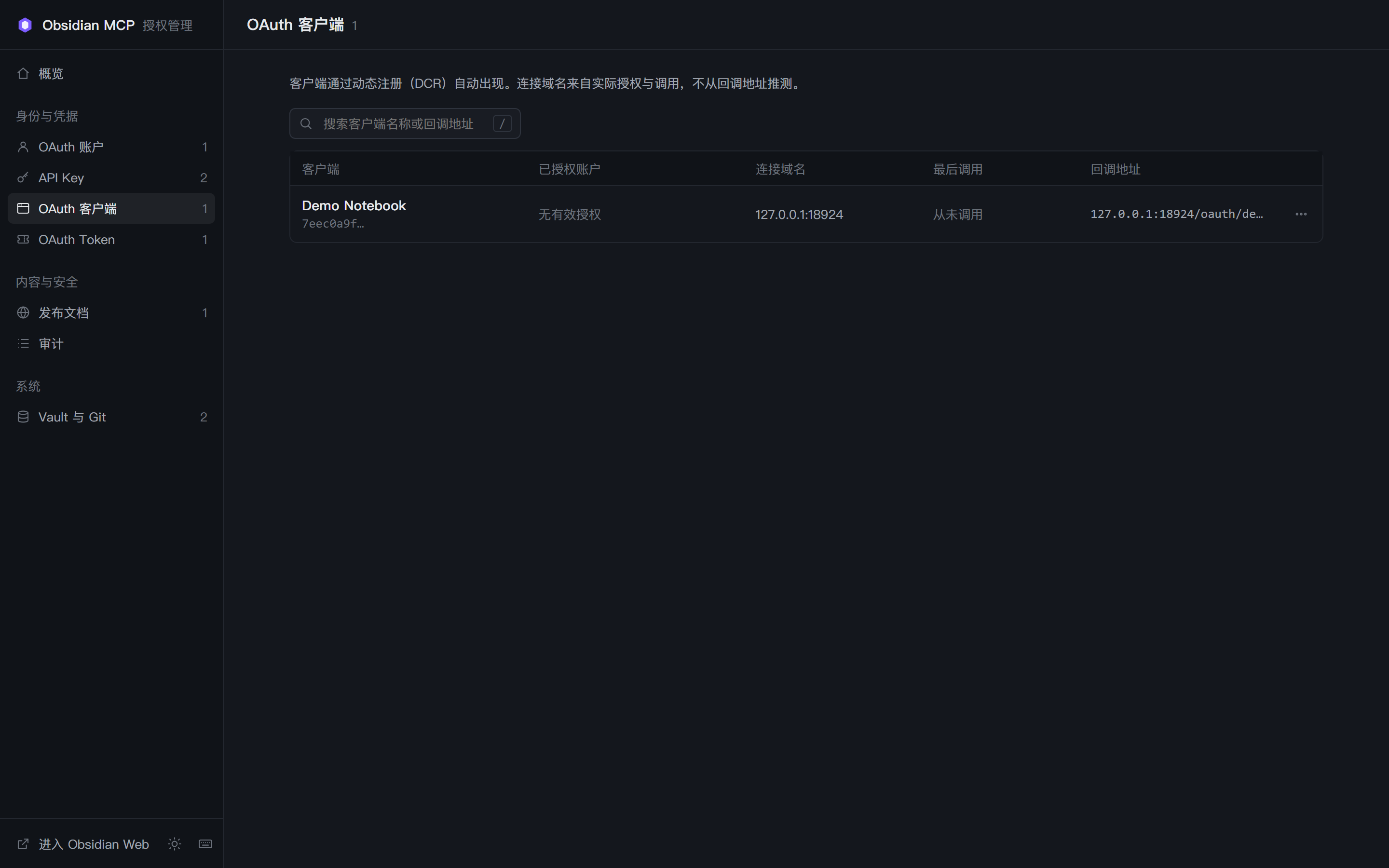
Admin OAuth clients
OAuth clientsOAuth 客户端16
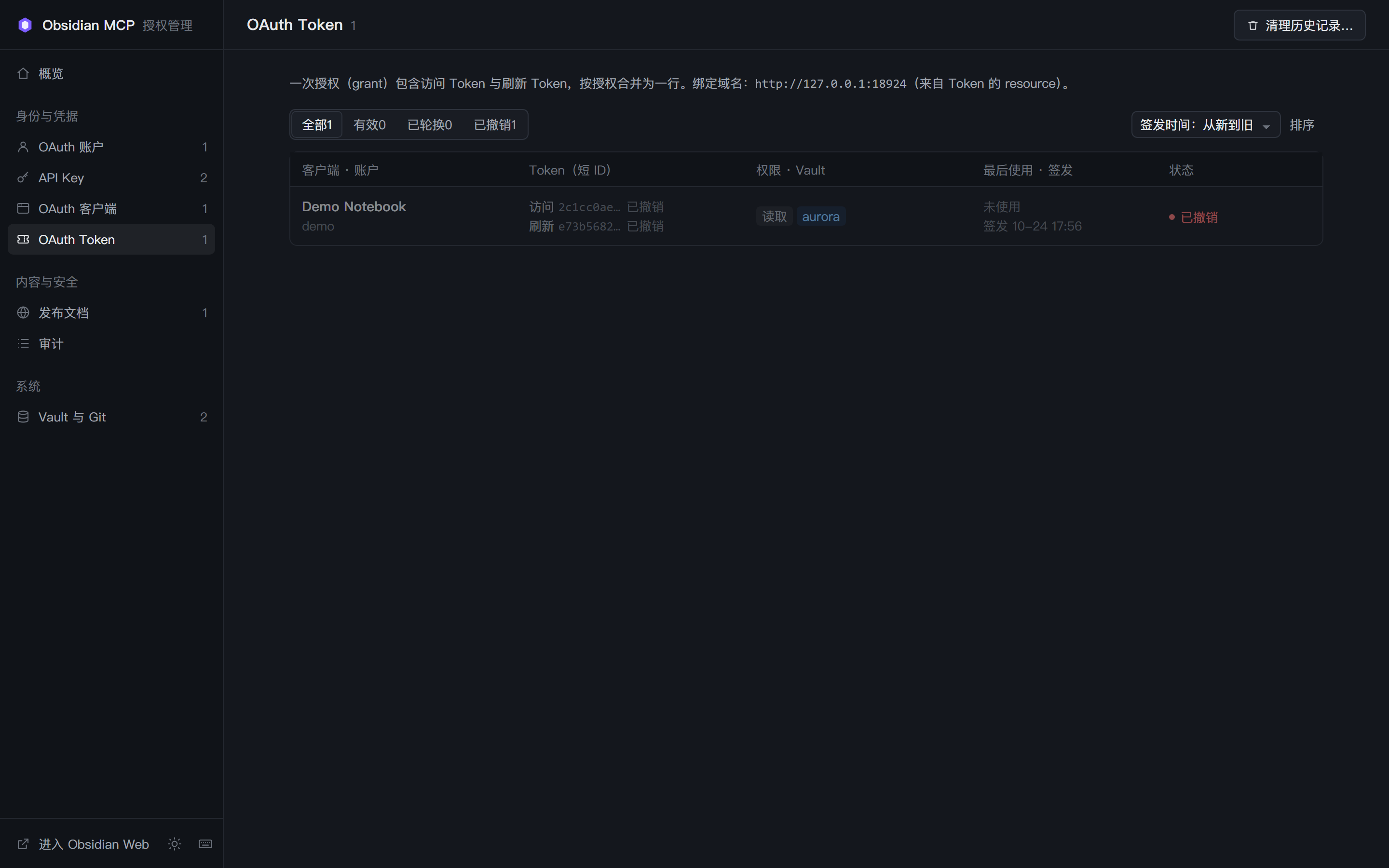
Admin OAuth tokens
OAuth grantsOAuth 授权17
Admin publish catalogue
Publish catalogue发布目录18
Admin audit log
Audit log审计日志19
Light mode workspace
Light mode浅色模式20
Theme settings
Theme controls主题设置21